System Overview
ModalConnect supports business operations and processes for case management, compliance, intelligence, investigation, across sectors such as: policing, defence, corrections, fisheries, security, environmental protection, finance and other domains. ModalConnect supports operational roles including front line staff, management and executive level positions, with an ability to work within and across departments, organisations and borders.
It provides enterprise level capability and capacity to meet the security, performance, and scalability requirements of a modern SaaS based product that leverages over 25 years of experience in building and deploying intelligence and investigation management systems for a variety of international government agencies and organisations.
Through role based configurable functions and pro-active alerting, ModalConnect aims to better support staff, providing secure access to information anytime and anywhere 24 x 7, advancing the intelligence and incident management capabilities of organizations.
ModalConnect is a configurable, modular ‘commercial off the shelf’ (COTS) SaaS solution. The security model across ModalConnect complies with Australian and New Zealand Government security standards.
ModalConnect is designed for the collection and collation of data from multiple sources to enhance the entity and association views when conducting assessments, reviews or investigations.
Extending beyond the capture of Documentation and structured forms, ModalConnect enables data to be imported and connected to entities, associated with cases and investigations.
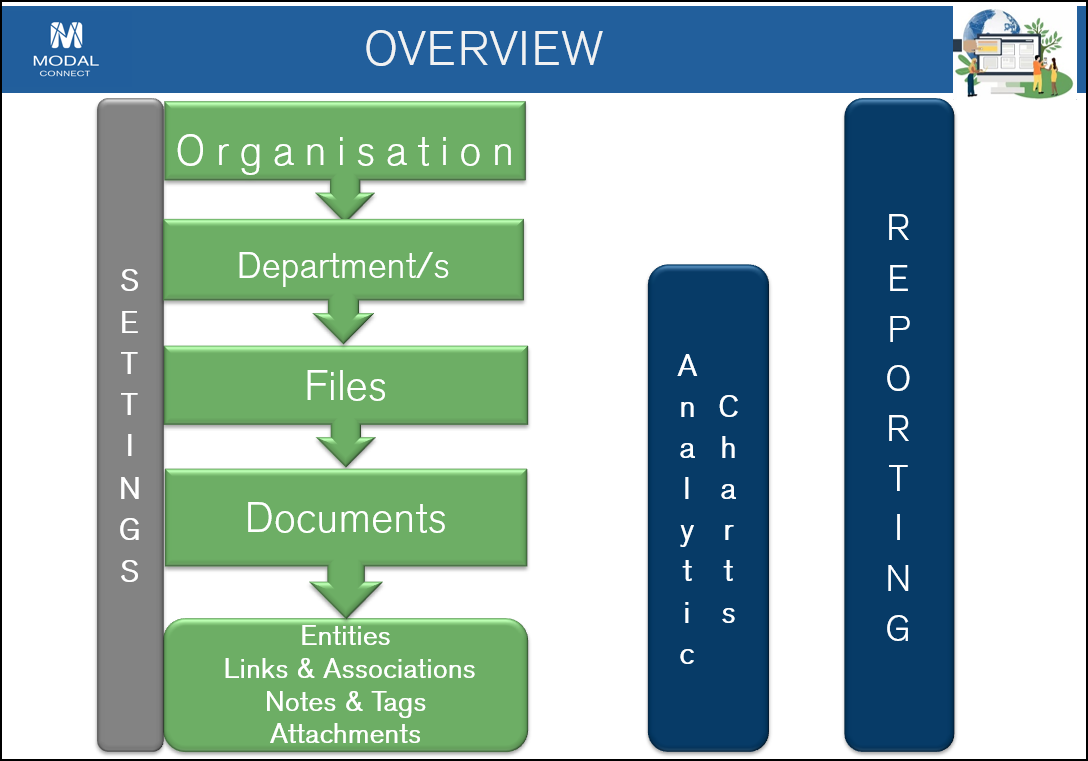
This graphic gives a high level overview of the structure and relationships of the records and functions.
The following Topics and features are available within this Learning Campus to help guide you through both the getting started and configuration process and to learn about and find information on how ModalConnect works; - click on the links to see the related Topics or select directly from the left menu.
Getting Started
Following your introduction and training - getting started is as easy as logging in to ModalConnect with the credentials provided to you by your Organisation and using these Learning resources as a guide and demonstration.
 Key Concepts and Features
Learn about how to navigate around ModalConnect and the menus, page layouts, buttons and viewing results.
See Menus and Navigation
System Settings
ModalConnect provides high levels of configurability that you control with a complete set of features ready for you from day one. The settings are usually available to and managed by the application or systems Administrators.
This topic covers all the system settings and how to configure these to suit your Organisation's requirements.
See About Settings
Help Centre
The Help Centre Topics cover all aspects of how to use ModalConnect for adding Files, Documents and content, extracting data from content, create and link Entities, analyse, visualise and reporting.
Search for a quick answer or follow step by step instructions with detailed screen-shots.
See the About the Help Centre
ModalConnect Videos
The Video Library series is designed to provide you with a quick visual 'How-to' resource.
Related videos from the Video Library are also available within the related Topics.
See the Video Library
Training Resources
Training Resources can be accessed here Training Collateral